How to Measure Link Building ROI with Analytics Tools
How to Measure Link Building ROI with Analytics Tools
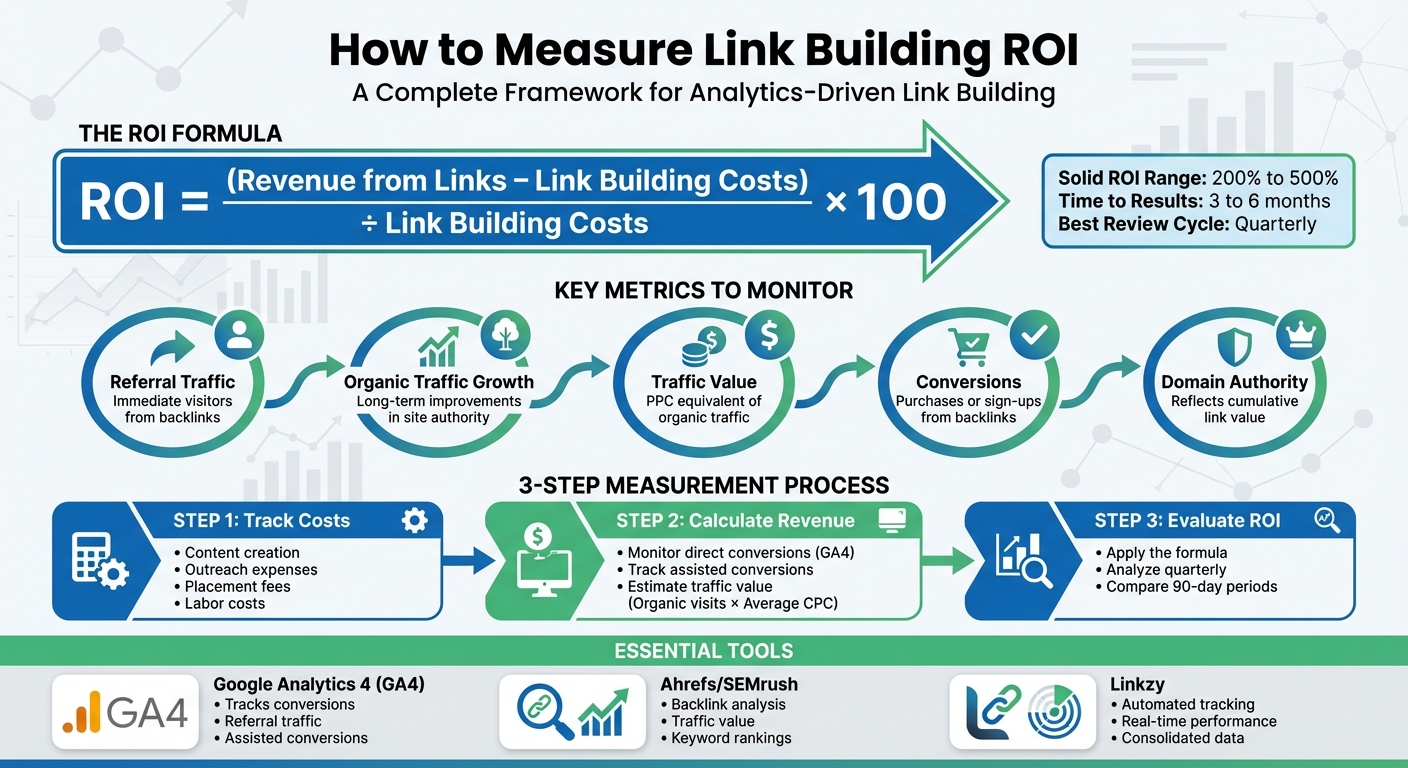
Measuring the ROI of link building is essential for maximizing your SEO budget and proving its value. Here's the key takeaway: ROI is calculated by comparing the revenue generated from backlinks (traffic, leads, or sales) to the costs of acquiring them. A solid ROI for link building typically ranges from 200% to 500%, but it requires patience - results often take 3 to 6 months to materialize.
Key Insights:
- Formula: ROI = (Revenue from Links – Link Building Costs) ÷ Link Building Costs × 100
- Direct Benefits: Referral traffic, conversions, and direct sales.
- Indirect Benefits: Better keyword rankings, improved domain authority, and long-term visibility.
- Tools to Use:
- Google Analytics 4 (GA4): Tracks conversions, referral traffic, and assisted conversions.
- Ahrefs/SEMrush: Analyzes backlinks, traffic value, and keyword rankings.
- Linkzy: Automates backlink performance tracking.
Key Metrics to Monitor:
- Referral Traffic: Immediate visitors from backlinks.
- Organic Traffic Growth: Long-term improvements in site authority.
- Traffic Value: PPC equivalent of organic traffic.
- Conversions: Purchases or sign-ups from backlinks.
- Domain Authority: Reflects cumulative link value.
Steps to Measure ROI:
- Track Costs: Include content creation, outreach, and placement fees.
- Calculate Revenue: Use GA4 to monitor direct and assisted conversions or estimate traffic value based on CPC.
- Evaluate ROI: Use the formula and analyze results quarterly for accuracy.
By combining tools like GA4, Ahrefs, and Linkzy, you can connect link-building efforts to measurable financial outcomes. Focus on quality over quantity, and give backlinks time to impact rankings. With consistent tracking and analysis, link building can evolve into a reliable driver of growth.
3-Step Process to Calculate Link Building ROI with Key Metrics and Tools
Link Building ROI: How To Calculate The Value Of Backlinks
sbb-itb-0f47b19
Why You Need to Measure Link Building ROI
When you're spending serious money on SEO - anywhere from $2,500 to $12,000 per month for managed services [2] - you can't afford to rely on guesswork. Measuring ROI takes the uncertainty out of link building and turns it into a calculated, data-driven strategy [1]. With the right metrics, you can pinpoint which link-building efforts are driving results and which are just draining your budget. This insight is essential when you're justifying SEO investments to stakeholders or deciding whether to lean into guest blogging or focus more on digital PR campaigns.
"If you spend $5,000, $10,000, or even $50,000 a month on link building, you should know what kind of return to expect."
- Travis Bliffen, CEO, Stellar SEO [5]
This kind of clarity is the foundation for defining ROI in link building.
How to Define ROI in Link Building
Defining ROI accurately is the first step to making smarter decisions about where to allocate your resources. Here's the standard formula for calculating link-building ROI:
ROI = (Revenue from Links – Link Building Costs) / Link Building Costs × 100 [7]
Let’s break it down with an example: Say you invest $5,000 in a link-building campaign and it generates $15,000 in revenue. That’s a 200% ROI.
Here’s what goes into the calculation:
- Revenue from Links: This includes both direct sales from referral traffic and the value of organic traffic growth. A common way to assign value is the "PPC equivalent" method: multiply your organic visits by the average cost-per-click (CPC) for those keywords. This gives you an idea of what it would have cost to generate that traffic through paid search [1].
- Link Building Costs: These cover everything - content creation, outreach tools, labor (whether in-house or agency), and any placement fees.
A return of 400% is often seen as a benchmark for a successful campaign [3]. But remember, link building is a long game. It’s best to evaluate ROI over 3–6 months since backlinks take time to be indexed and influence search rankings [1][6]. Quarterly reviews tend to provide a clearer picture than monthly ones because they account for the natural lag in SEO results.
Direct vs. Indirect Benefits of Link Building
To truly understand the ROI of your link-building efforts, you need to consider both direct and indirect benefits. Each offers unique value and shapes your overall strategy.
Direct benefits are the immediate, measurable results you can tie to a specific backlink. Think referral traffic, conversions, and sales that stem directly from a link.
Indirect benefits are harder to measure but just as important. These include higher keyword rankings across your site, improved Domain Authority (DA) or Domain Rating (DR), greater brand visibility, and the accumulation of link equity that helps future content rank faster [7].
"Measuring link building ROI connects SEO performance to financial outcomes."
- Kasra Dash, SEO Strategist [1]
One of the biggest challenges with indirect benefits is multi-touch attribution. Customers often engage with multiple marketing channels before converting, making it tricky to isolate the impact of a single backlink. Tools like Google Analytics 4's path exploration can help track assisted conversions, giving you a clearer picture of how each backlink contributes to the customer journey [1].
Key Metrics to Track for Link Building ROI
Tracking the right metrics can make or break your link-building campaigns. The goal is simple: focus on metrics that tie directly to your revenue. For instance, referral traffic offers an immediate snapshot of performance - these are visitors clicking through your backlinks right away. On the other hand, organic traffic growth highlights the long-term benefits as your site authority improves over several months. Ultimately, metrics like conversions and revenue measure the actual financial return of your efforts. While secondary indicators like Domain Authority and traffic value provide additional context, they’re not the main focus when calculating ROI [1].
Here’s a quick breakdown of the key metrics to monitor:
| Metric | What It Measures | Why It Matters for ROI |
|---|---|---|
| Referral Traffic | Visitors coming directly from backlinks | Shows short-term performance and value [2] |
| Organic Traffic | Total search engine visitors | Tracks long-term authority and visibility [1] |
| Traffic Value | PPC equivalent cost of organic traffic | Converts SEO gains into dollar terms [1] |
| Conversions | Purchases or sign-ups | Direct measure of financial return [2] |
| Domain Authority | Overall ranking power (Moz/Ahrefs) | Reflects the cumulative value of backlinks [1] |
Let’s break these metrics down further to understand their direct impact on ROI.
Referral Traffic Volume and Sources
Referral traffic is your first indicator of a backlink’s performance. Every time someone clicks a backlink and lands on your site, you get a clear picture of how effective that link is [2].
To analyze this, track both the volume and quality of your referral sources. In Google Analytics 4 (GA4), the "Session source" dimension lets you see which websites are driving traffic. High-quality backlinks - especially those from respected websites in your niche - should attract engaged visitors. Metrics like low bounce rates and longer session durations signal that the traffic is relevant and valuable.
You can also calculate the monetary value of referral traffic. For example, in GA4, set up key events like purchases or sign-ups. Then, divide your total revenue by the number of sessions to find your "value per session." If each session is worth $5 and a backlink drives 200 visitors per month, that link is generating $1,000 in monthly value. If acquiring that link cost $300, you’re looking at a 233% ROI in just one month.
"It's not just about building backlinks; it's about building the right links that drive meaningful results."
- Natalia Toth, Marketing Manager, Ranking Raccoon [2]
Organic Traffic Growth and Keyword Rankings
While referral traffic provides immediate feedback, organic traffic growth is where the long-term benefits of link building shine. As your site gains quality backlinks, its authority increases, leading to higher rankings in search results and, ultimately, more visitors [1].
However, organic growth isn’t instant - it can take anywhere from 3 to 12 months to see significant changes. Reviewing metrics quarterly instead of monthly can help capture the full impact of your efforts. A small ranking improvement, like moving from the third position to first, can increase your click-through rate from 10% to 30% [4]. These higher rankings not only drive more traffic but also boost your revenue potential.
To track this growth, monitor target keywords using tools like Ahrefs or SEMrush. Additionally, comparing organic traffic in GA4 before and after your link-building campaigns can reveal long-term gains. Estimating traffic value - essentially what your organic traffic would cost if you paid for it via Google Ads - can also help translate these SEO results into a clear financial picture [1].
"In the short-term, your ROI may be quite small or even negative. It's only when you start considering the lifetime value of your customers and other long-term effects does the true value of link building start to show."
- Kevin Rowe, Founder & Head of Digital PR Strategy, PureLinq [4]
Conversions and Revenue from Backlinks
At the end of the day, conversions and revenue are what truly matter. A backlink that drives hundreds of visitors but results in zero sales isn’t worth much. On the flip side, a link that brings fewer but highly targeted visitors who convert at a strong rate is incredibly valuable [2].
Use GA4 to track both direct conversions (like purchases or sign-ups that happen immediately after a backlink click) and assisted conversions (which show how backlinks contribute to multi-step customer journeys). GA4’s path exploration reports can reveal these broader patterns, offering a more complete picture of your link-building impact [1].
To calculate ROI, apply the same formula discussed in the "How to Define ROI in Link Building" section. A strong ROI typically falls between 200% and 500% [1].
Patience is essential here. Link building is a long-term investment, and it takes time to see the full payoff. Track your metrics consistently, give campaigns at least 90 days to mature, and focus on links that generate both immediate traffic and long-term growth.
How to Use Analytics Tools to Measure Link Building ROI
Measuring the return on investment (ROI) for link-building efforts requires more than just one tool. Google Analytics 4 (GA4) is excellent for tracking on-site user behavior like conversions, bounce rates, and session durations. Meanwhile, tools like Ahrefs and SEMrush focus on off-site metrics, such as backlink profiles, domain authority, and competitor link gaps. By combining these tools, you can connect your SEO strategies to measurable financial outcomes [1].
Using multiple tools not only provides a clearer picture but also ensures data accuracy. For instance, research shows that Ahrefs may underestimate organic traffic by approximately 36% [10]. Additionally, around 40–45% of marketers face challenges in accurately evaluating their link-building efficiency [2], often because they rely on a single data source.
Each tool has its strengths. GA4 specializes in tracking user behavior and revenue, while SEO platforms provide insights into traffic value and competitive link gaps. By integrating these analytics with automated tracking solutions, you can streamline the process of measuring link-building ROI. Let’s dive into tool-specific setups to make this process more effective.
Setting Up Google Analytics 4 for Link Tracking
To get started with GA4, define Key Events that align with your goals. Go to Admin > Property Settings > Data Display > Events and mark actions like purchases, sign-ups, or form submissions as key events. This setup allows you to track conversions originating from backlinks [2].
Next, filter referral traffic using the Traffic Acquisition report. Navigate to Acquisition > Traffic Acquisition and filter by "Session source/medium" to pinpoint external sites driving visitors [2]. Beyond just traffic numbers, review metrics like Average Engagement Time and Bounce Rate to ensure the quality of the referral traffic [8].
For more precise tracking, add UTM parameters to your URLs and filter out spam traffic. For example, a tagged URL might look like this:
yoursite.com/page?utm_source=partnerblog&utm_medium=referral&utm_campaign=guestpost-jan2026.
GA4 also offers Path Exploration, which helps you analyze multi-touch attribution [1]. By linking GA4 with Google Search Console, you can identify referring sites even if they don’t immediately generate traffic.
While GA4 focuses on on-site behavior, tools like Ahrefs and SEMrush reveal essential off-site metrics.
Using Ahrefs and SEMrush for Backlink Analysis
Ahrefs and SEMrush provide a metric called Traffic Value, which combines organic search rankings, monthly search volumes, and cost-per-click (CPC) data. This metric estimates the cost of acquiring similar traffic through Google Ads [9]. For context, Ahrefs processes over 10 billion keywords daily [9].
Here’s a simple formula to translate SEO efforts into business terms:
Traffic Value = Total Organic Visits × Average CPC [1].
While this is a helpful indicator, keep in mind that it may not account for seasonal trends [9].
Both tools also offer Link Gap Analysis, allowing you to compare your referring domains with those of competitors. This feature helps you identify how many unique, dofollow links you need to close the gap. For example, if a competitor has 150 referring domains and you have 80, you may need 70 additional quality backlinks to catch up.
Additionally, monitor metrics like Domain Rating (DR) in Ahrefs or Authority Score in SEMrush to track your site’s authority growth. Remember, these metrics use a logarithmic scale, so moving from DR 10 to 20 is much easier than jumping from DR 70 to 80 [10]. Keep an eye on how quickly you’re gaining new referring domains compared to competitors.
When analyzing backlinks, don’t focus solely on DR or DA. Even lower-authority links (like DR 20) can be valuable if they are topically and geographically relevant. Use filtering tools to weed out low-value links, such as spam, irrelevant networks, or sitewide footers, so your ROI analysis centers on links that genuinely boost authority [5].
Using Linkzy for Automated Backlink Performance Tracking
To simplify tracking, Linkzy automates backlink performance monitoring by consolidating data from multiple sources. With a single tracking snippet, Linkzy provides real-time insights into backlink performance, eliminating the need for manual UTM configurations or juggling multiple dashboards.
The platform’s AI schedules contextual backlinks at a natural pace, aligning with search engines’ expectations for gradual link growth. When setting up, you can specify your niche, and Linkzy ensures backlinks come from real, relevant websites.
Its real-time analytics reveal which backlinks drive traffic, engagement, and conversions. This consolidated approach removes the guesswork of cross-referencing data between GA4, Ahrefs, and other tools, making it easier to calculate ROI.
Linkzy works with any website platform, including WordPress, Shopify, Webflow, or custom builds. Integration is straightforward via API or a WordPress plugin. The free plan includes 3 credits for testing, while paid plans start at $19 per month for 5 credits and $29 per month for 15 credits, offering priority support for higher-tier users.
Step-by-Step Guide to Calculating Link Building ROI
Start by keeping track of all your link-building expenses - this includes direct costs like placements and sponsored posts, as well as indirect costs like content creation, outreach tools, and labor involved in the process[1].
Next, figure out the value of your backlinks. Tools like Ahrefs or SEMrush can help you identify the average cost-per-click (CPC) for your ranking keywords. Multiply the CPC by your total organic visits to estimate the traffic value your links are driving[1]. For direct revenue tracking, use Google Analytics 4 (GA4) to monitor key events from referral sources, such as purchases or completed lead forms[2]. If you're not running an e-commerce site, assign a fixed value to each lead based on your historical conversion data.
Now, calculate ROI using this formula: ROI (%) = [(Total Value Gained – Total Cost) / Total Cost] × 100[1]. This formula ties your investment directly to the metrics you've been monitoring and gives you a clear picture of your campaign's performance.
"If you base your link budget on raw link counts, you will overspend, chase junk, or both. Calculating ROI is not about how many links your competitors have - it's about how many valuable links they have."
– Travis Bliffen, CEO, Stellar SEO[5]
Give your backlinks some time - typically 3 to 6 months - to be indexed and start influencing your rankings[1][4]. After that, compare your organic rankings and traffic from 90 days before and after the links went live to get a more accurate ROI picture. It's better to report ROI on a quarterly basis rather than monthly, as short-term fluctuations can distort the results[1]. Be sure to exclude low-quality links, such as spammy or irrelevant ones, to maintain the accuracy of your measurements[5]. Following these steps ensures a clear, data-backed understanding of how your link-building efforts are paying off.
Conclusion
Measuring the ROI of link building isn't just a good idea - it’s a necessity. It’s how you separate smart investments from wasted resources. By tracking metrics like referral traffic, organic growth, and conversions, you can identify which backlinks are driving value and which ones are falling flat. Keep in mind, though, that link building is a long game. It often takes 3 to 6 months before you start seeing substantial results, so patience and consistent monitoring are key [1].
"This continuous loop of measurement and refinement is what turns link-building from a cost center into a revenue driver."
– Srikar Srinivasula, Founder, OutreachZ [3]
To stay on top of your efforts, configure analytics tools to track key events, tag campaign URLs with UTM parameters, and use web-based backlink trackers for precise data. Tools like Linkzy can simplify this process by automating backlink performance tracking. This is especially helpful since 40–45% of marketers report struggling to measure the effectiveness of their link-building efforts [2]. Regular monitoring and periodic analysis are the backbone of a robust link-building strategy.
Quarterly reviews are a great way to ensure your efforts stay aligned with your long-term goals. Use these reviews to refine your tactics - double down on strategies that deliver strong results and cut the ones that don’t. And always prioritize quality over quantity. A single, high-authority backlink that’s relevant to your niche will outperform a dozen low-quality ones every time.
The goal isn’t perfection. Instead, focus on building a system for continuous measurement, learning, and adjustment. With this approach, link building evolves from guesswork into a reliable channel for driving revenue growth.
FAQs
How long does it take to see a return on investment (ROI) from link building?
Link building is not a quick fix - it’s a strategy that requires time and persistence. On average, it can take several months to see a noticeable return on investment (ROI). In some situations, it might even stretch to a year, influenced by factors such as the quality of the links you acquire, the niche you operate in, and how competitive your industry is.
The process is all about the long game. By steadily building authority and trust, link building helps improve your search engine rankings and, in turn, boosts your organic traffic over time. Patience and consistency are essential to seeing results.
What metrics should I track to measure the ROI of link-building efforts?
To truly understand the impact of your link-building efforts, it’s essential to keep an eye on metrics that highlight both traffic and conversions. Here are some key areas to focus on:
- Organic traffic growth: Keep track of how many visitors are landing on your site via search engines and note any upward trends.
- Referral traffic: Check the number of visits coming directly from the websites hosting your backlinks.
- Keyword rankings: Look at how your targeted keywords are performing in search engine rankings over time.
- Domain authority: Pay attention to shifts in your website’s authority score or rating as it evolves.
- Conversions: Dig into the data around leads, sales, or revenue linked to your link-building efforts.
By regularly monitoring these metrics, you’ll get a clear picture of how your link-building strategy is driving results and aligning with your broader business objectives.
How can I track the ROI of my backlinks using Google Analytics 4?
To evaluate how your backlinks are performing in Google Analytics 4 (GA4), follow these steps:
- Make sure your GA4 property is properly set up, and the tracking tag is active on your website, especially on pages that receive backlink traffic.
- Navigate to Reports → Acquisition → Traffic acquisition and apply a filter for referral traffic. This will show you visits coming from external links.
- Use the Session source dimension to pinpoint which websites are driving traffic. Sort the data by metrics like users or sessions to identify your most effective backlinks.
- Dive deeper into engagement and conversion metrics such as average engagement time, bounce rate, and specific conversion events (like purchases or sign-ups) to gauge the quality of the traffic.
If you're using Linkzy for automated backlink placement, don't forget to integrate its tracking snippet. This allows GA4 to correctly attribute traffic from backlinks created by Linkzy's AI-powered service. By regularly reviewing this data, you can identify which links deliver the most value and refine your approach to maximize ROI.